The Hidden Fear That Drives Your Visitors Away
Imagine you have spent months building your dream website. You have written great articles and shared your best ideas. One morning, you ask a friend to check your site.
They type your URL and suddenly, their screen turns red. A giant warning message pops up. It says, "Your connection is not private." It tells them that attackers might be trying to steal their passwords or credit cards.
Your friend feels a sudden chill. They immediately click the "Back to Safety" button. They never even see your beautiful homepage. This is the heartbreaking reality for thousands of website owners who ignore a small digital file called an SSL certificate.
It is more than just a technical error. It feels like a personal failure. You put your heart into your work, but the internet is telling people you are not safe.
This creates a deep sense of anxiety. You wonder how many potential customers you have lost today. You worry that your brand is being labeled as "dangerous" or "unprofessional."
The mental stress of seeing your traffic drop while your competitors grow is heavy. You feel stuck because the technical world of hosting and domains seems too hard to understand.
But you are not alone in this struggle. Every successful person online started exactly where you are. They had to learn how to bridge the gap between "having a site" and "having a trusted site."
The good news is that this problem has a very simple fix. Once you understand why this happens, you can flip the switch and turn that "Not Secure" warning into a badge of honor.
A Simple Guide to Turning Your Site into a Fortress of Trust
You do not need to be a computer genius to fix your website's credibility. It starts with understanding how a secure connection works in plain English.
The Secret Handshake Between Your Site and Your Visitor
When someone visits your website, their browser (like Chrome or Safari) talks to your web server. Without an SSL certificate, this talk is like shouting across a crowded room. Anyone standing nearby can hear the secrets being shared.
SSL (Secure Sockets Layer) acts like a private, locked room for this conversation. It creates a "secret handshake" that only the browser and the server understand.
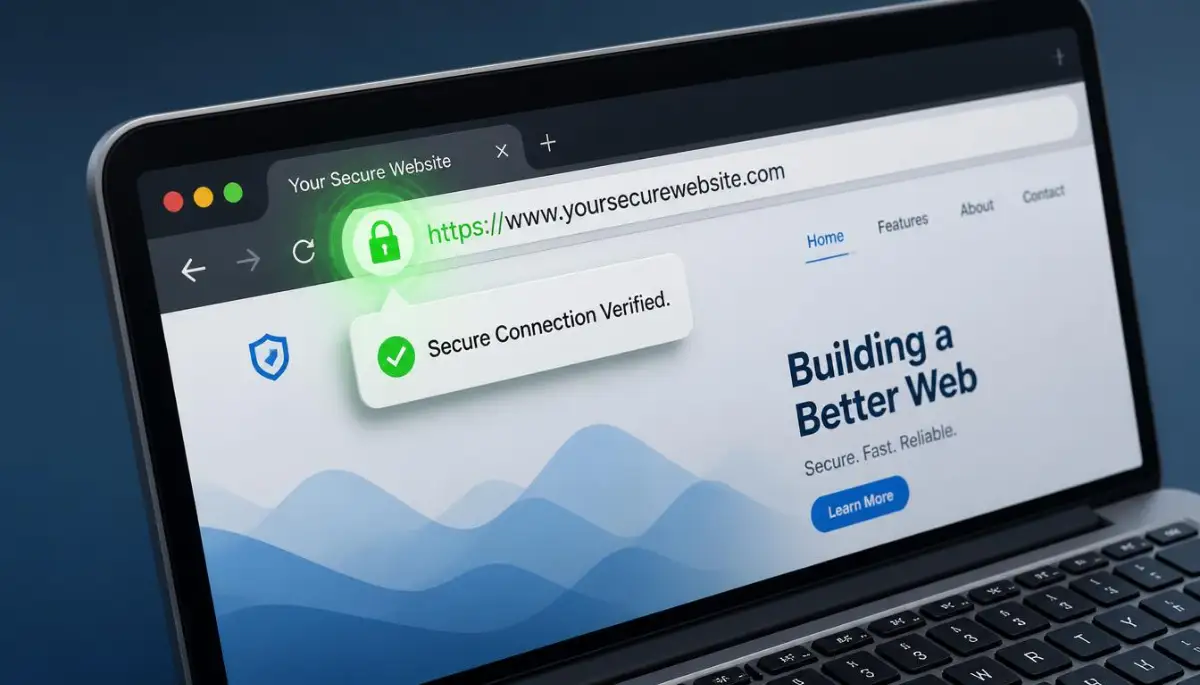
When you install this certificate, your website address changes from HTTP to HTTPS. That extra "S" stands for Secure. It tells the world that you care about their safety.
Why the Little Green Lock is Your Best Salesman
Think about your own habits. When you go to a site to buy something or enter your email, where do you look? Most people subconsciously look at the top left corner of the browser.
If they see that tiny padlock icon, they feel a sense of relief. Their brain says, "Okay, I can trust this place." This is a powerful psychological trigger.
Boldly showing that you are secure builds instant rapport. It shows you are professional. It shows you are not a "fly-by-night" operation.
Without that lock, you are asking users to take a huge risk. In today’s world, people are very smart about their data. They will not give their information to a site that looks broken or unprotected.
How Encryption Keeps Digital Thieves Away
Let’s talk about data encryption in a way that makes sense. Imagine sending a letter in a clear glass envelope. Anyone who touches that letter can read it.
That is what happens on a website without SSL. If a user types their password, a hacker can see it easily.
SSL turns that glass envelope into a heavy steel safe. Only the person with the right key can open it. This process is called encryption.
Even if a hacker grabs the data, they will only see a bunch of random symbols. They cannot use it. They cannot steal from your users.
Protecting your audience is the highest form of credibility. When you keep people safe, they reward you with their loyalty and their time.
Why Search Engines Love Secure Websites
You want your website to show up on the first page of Google, right? Well, Google has a very clear goal. They want to give their users the best and safest experience possible.
Several years ago, Google made a big announcement. They said that HTTPS is now a ranking signal. This means that if two websites are exactly the same, but one has SSL and the other doesn't, the secure one will rank higher.
Google wants to protect its users. If your site is not secure, Google might even lower your ranking or show a warning to people who try to click your link.
By installing a certificate, you are telling search engines, "I am a responsible owner." You are making it easier for them to recommend your content to others.
Different Levels of Security for Different Needs
Not all SSL certificates are the same. Depending on what you do online, you might need a specific type. Let’s look at the three main options:
- Domain Validation (DV): This is the most common type. It is great for blogs and small websites. It proves you own the domain and provides basic encryption. It is usually very cheap or even free.
- Organization Validation (OV): This is for businesses that want to show a bit more trust. The certificate provider checks if your business is real. It offers a higher level of confidence for your visitors.
- Extended Validation (EV): This is the top tier. You see this on big bank websites or giant online stores. It requires a very strict background check.
Most bloggers only need a simple DV certificate. It is enough to get the padlock and the HTTPS prefix. It is the best starting point for building a solid reputation.
The Real Cost of Doing Nothing
You might think, "I'll wait until my site gets bigger to worry about security." This is a dangerous mistake.
Trust is hard to build but very easy to lose. If a first-time visitor sees a security warning, they will likely never come back. They will remember your name as "that unsafe site."
Also, modern browsers are getting stricter every day. They are making the "Not Secure" warnings bigger and more frightening.
Ignoring this is like leaving your shop door wide open at night. Even if nothing is stolen, it looks bad to the neighbors. It shows a lack of care.
Investing a few minutes to set up your security is the best gift you can give your digital future. It removes a massive barrier between you and your audience.
How to Get Started with Your Own Certificate
Many people think they have to pay hundreds of dollars for security. That is a myth.
Most modern web hosting companies now offer Free SSL through a service called "Let’s Encrypt." You can often turn it on with just one click in your hosting dashboard.
I recommend checking your hosting settings today. Look for a section called "Security" or "SSL/TLS." You might be surprised to find that you already have access to it for free.
If your host doesn't offer it, you can buy a low-cost certificate from many domain sellers. It is a small price to pay for the massive boost in professional image you will receive.
Keeping Your Security Healthy and Active
Once you have your certificate, you cannot just forget about it. SSL certificates have an expiration date. They usually last for 90 days or one year.
Most hosts will renew them automatically for you. But it is always a good idea to check your site once a month. Look for that padlock.
If the padlock has a red line through it or a warning icon, something is wrong. It might be a "mixed content" error. This happens when your site is secure, but you are trying to show an image from an old, unsecure link.
Cleaning up these small errors shows attention to detail. It tells your visitors that you are active and you care about the small things.
Final Thoughts on Building Your Online Home
Your website is your home on the internet. You wouldn't invite guests over if your front door was broken and your windows were smashed.
An SSL certificate is the lock on your front door. It makes your guests feel safe. It makes them want to stay longer and listen to what you have to say.
When you take security seriously, you are not just following a technical rule. You are building a foundation of honesty and integrity.
People do business with people they trust. People read blogs from authors they trust. Start building that trust today by making your website a safe place for everyone.
This is the first and most important step in your journey to the top of the search results and the hearts of your readers.
Mastering the Technical Side of Website Trust
Now that you know the basics of why security matters, let’s talk about how to stay ahead. Having a padlock is great, but maintaining a high level of trust requires a bit more effort.
Think of your website like a high-end car. Buying it is just the start. You need to keep it tuned up to ensure it runs safely every single day.
One of the best ways to do this is by using a tool called HSTS (HTTP Strict Transport Security). This is a small instruction you give to web browsers.
It tells the browser to only talk to your website using a secure connection. This stops hackers from trying to trick your visitors into using an older, unsafe version of your site.
Setting this up might sound scary, but it is a game-changer for your reputation. It shows that you are not just checking a box, but you are truly protecting your users. You can learn more about how HSTS works and how to use it to keep your connection locked down.
Another expert secret is to always monitor for Mixed Content errors. This happens when your site has an SSL certificate, but some images or scripts are still using old links.
It makes the browser show a warning that your site is "not fully secure." This can be very confusing for your visitors.
They see the padlock, but they also see a warning. This sends a mixed message about your brand. You want your security to be solid and consistent.
I always suggest using a "search and replace" tool to make sure every single link on your site starts with HTTPS. This small step removes any doubt from your visitor's mind.
We live in a world where digital assets are more important than ever. Just like protecting your crypto for decades requires specific steps, your website needs constant care.
Security is not a "one and done" task. It is a habit that ensures your hard work stays visible to the world.
If you want to stay in the top rankings, you must keep your server settings updated. Talk to your hosting support once in a while. Ask them if they are using the latest version of TLS (Transport Layer Security).
TLS is the modern tech that makes SSL work. Staying updated ensures that your site is fast and safe.
Fast websites with great security are exactly what Google loves to show its users. By staying on top of these technical details, you are building a digital fortress.
This fortress protects your content, your users, and your income. It is the best way to ensure that your site stays successful for a long time.
The real power of blockchain technology shows us how much we value secure data today. Your website is no different. It is a piece of data that deserves the highest level of protection.
The Dangerous Shortcuts That Ruin Your Reputation
I have seen many people lose their hard-earned traffic because of simple mistakes. These errors often come from trying to save time or a few dollars.
The biggest mistake is letting your certificate expire. Imagine your visitor landing on your site and seeing a red "Danger" sign.
This feels like a punch in the gut for a site owner. All the trust you built over months can vanish in a single second.
Users do not care if you simply "forgot" to renew. They only see that your site looks abandoned and unsafe. It feels like walking into a store with no lights on and broken windows.
Another common pitfall is using poor-quality certificates. While free options like Let's Encrypt are great, some cheap providers have slow servers.
If your security check takes too long, your website will load slowly. Modern users are very impatient. If your site doesn't load in three seconds, they will leave.
You should also avoid ignoring mobile users. Sometimes, a certificate works perfectly on a computer but shows an error on a phone.
Since most people browse the web on their phones, this is a massive problem. Always test your site on multiple devices to ensure that the padlock is visible everywhere.
I once talked to a blogger who lost half her traffic overnight. She had installed a new plugin that broke her secure connection.
She didn't notice for a week. By then, her search engine rankings had already started to drop. It was a painful lesson in why we must double-check our work.
Recovering from a security failure is a lot like trying to rebuild your credit score. It takes much more time to fix the damage than it does to prevent it in the first place.
Don't let a simple mistake destroy your dreams. Be proactive. Set up alerts so you know exactly when your certificate needs attention.
When you treat your website security with respect, your visitors will treat your brand with respect. It is a simple trade-off that leads to massive success.
Why You Should Never Wait for a Problem to Happen
Waiting until you get hacked or a warning pops up is a recipe for disaster. By then, the damage to your brand is already done.
People remember bad experiences more than good ones. If they feel unsafe on your site once, they might never trust your links again.
This is why proactive security is the only way to grow. It gives you peace of mind. You can sleep better knowing that your digital "front door" is locked and bolted.
Understanding the history of encryption shows us that security has always been a race. The bad guys are always trying to find a way in.
Your job is to make it as hard as possible for them. A properly set up SSL certificate is your first and most effective line of defense.
It keeps the "prying eyes" away from your visitors' personal information. This creates a safe space where your community can grow and thrive.
Taking the First Step Toward Lasting Online Authority
You now have a clear path to making your website one of the most trusted spots on the internet. We have covered everything from the emotional pain of a "Not Secure" warning to the pro-level tips for staying safe.
Security might feel like a technical chore, but it is actually an act of kindness. You are telling every visitor that you care about their privacy.
When people feel cared for, they stay. They read your words. They share your content. They become your biggest fans.
I want you to take a moment today to look at your site. Does it have that beautiful green padlock? Is it using HTTPS on every single page?
If not, make it your top priority. Don't wait until tomorrow. The internet never sleeps, and potential visitors are clicking your links right now.
Give them the gift of security. Give yourself the gift of a professional reputation. You have put so much work into your website; don't let a small security file be the thing that holds you back.
Your Quick Action Plan for Total Peace of Mind
To help you get started, here is a simple checklist you can follow today:
- Check your auto-renew settings: Log into your hosting account and make sure your SSL will renew by itself.
- Force HTTPS: Set up a redirect so that anyone typing your old address is automatically sent to the secure version.
- Audit your images: Use a free online tool to check for "Mixed Content" errors and fix them immediately.
- Test on your phone: Open your website on your mobile browser and look for any warnings.
By following these steps, you are joining the ranks of the world's most professional website owners. You are no longer just a hobbyist; you are a responsible digital leader.
The road to success is paved with trust. And trust starts with a secure connection. I am so excited to see your website grow and reach new heights.
Go ahead and lock down your site today. Your future self—and your visitors—will thank you for it!
Disclaimer: The information provided in this article is for educational purposes only. While I am an expert in web strategy, security technologies change often. Always consult with your specific hosting provider or a professional developer before making major changes to your server settings. I am not responsible for any technical issues that may arise from improper installation of certificates or server configurations.
![How to Move Your Website to a New Server [Without Fear]](https://topic36.com/storage/uploads/blogs/1787759627_how-to-move-your-website-to-a-new-server-without-fear.webp)
![How to Secure Your Website and Stop Hackers [The Ultimate Blueprint]](https://topic36.com/storage/uploads/blogs/1787043730_how-to-secure-your-website-and-stop-hackers-the-ultimate-blueprint.webp)