
The Hidden Physical Cost of the Remote Work Dream
Working from home was supposed to be the ultimate freedom. You imagined waking up, grabbing coffee, and working in your pajamas from the comfort of your couch.
But lately, the reality feels different. Your neck feels like it is carrying a heavy weight by 2:00 PM. Your lower back throbbed last night when you finally stood up to cook dinner.
You find yourself rubbing your wrists constantly. You might even feel a bit irritable or tired, even though you didn't leave the house.
I see this every day. People trade their commute for a desk that is actually just a kitchen table or a soft sofa.
At first, it feels fine. Then, the "niggles" turn into sharp pains. Your focus starts to slip because you can’t find a comfortable way to sit.
It’s frustrating when your body feels older than your age. You want to be productive, but your physical discomfort is yelling louder than your tasks.
Does this sound like you? "I just need a better chair," you tell yourself. But it is often more than just a chair.
It is about how your body interacts with your space. It is about the mental fatigue that comes from physical strain.
When your body hurts, your brain can't think clearly. We are going to change that today.
You deserve a workspace that supports you, not one that breaks you down. Let's look at how to fix this without spending a fortune.
Rethinking Your Foundation: The 90-90-90 Rule
Most people sit down and just start typing. They don't realize their body is slowly twisting into a "C" shape.
To fix this, we need to focus on the 90-90-90 rule. This is a simple way to check your alignment.
First, look at your elbows. They should be bent at a 90-degree angle while you type.
Next, check your hips. Your hips should be at a 90-degree angle relative to your torso.
Finally, your knees should be at a 90-degree angle with your feet flat on the floor.
If your feet are dangling, your lower back is taking all the pressure. You can use a stack of books or a sturdy box if you don't have a footrest.
Pro Tip: If you use a kitchen chair, put a small pillow behind your lower back. This supports the natural curve of your spine.
Eye Level: Stopping the "Tech Neck" Before It Starts
Your head weighs about 10 to 12 pounds. When you lean forward to look at a low laptop, that weight doubles or triples for your neck muscles.
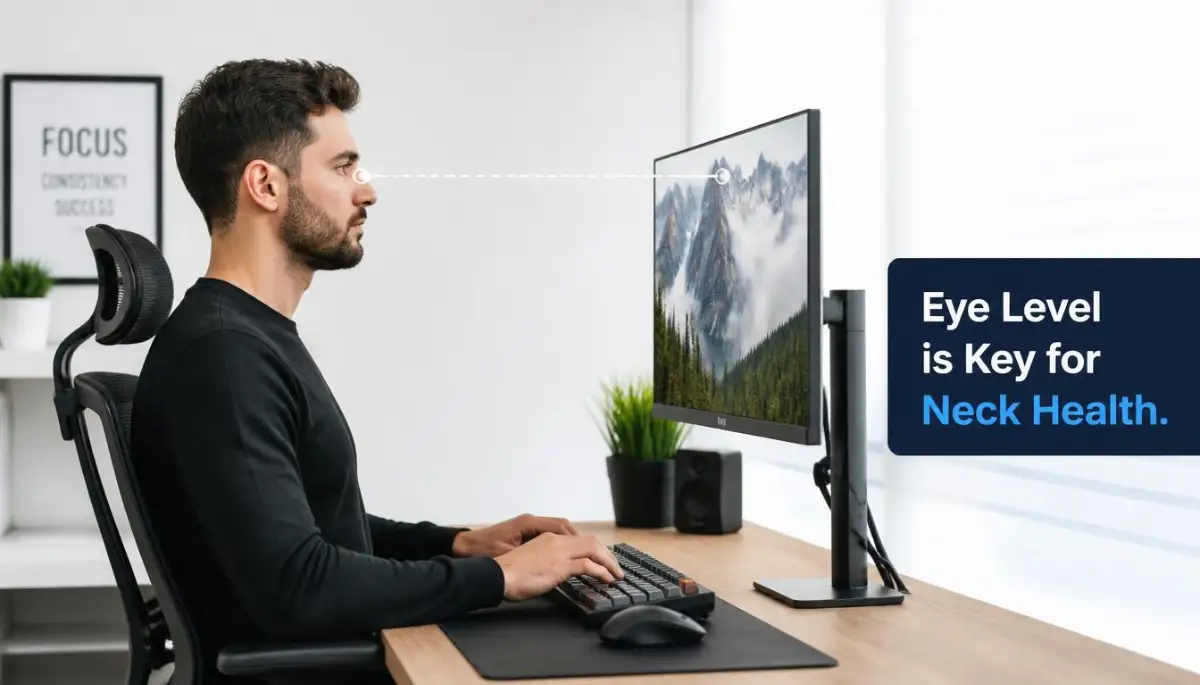
This is why your shoulders feel like rocks at the end of the day. Your monitor must be at eye level.
The top third of your screen should align with your eyes. This keeps your chin tucked and your neck straight.
If you use a laptop, please stop placing it directly on the desk. This forces you to look down constantly.
Use a laptop stand or even a pile of thick books to raise it up. You will need an external keyboard and mouse to make this work.
Keeping your neck neutral is the fastest way to stop daily headaches. It also helps you breathe better because your chest isn't collapsed.
The Secret Language of Your Wrists and Hands
Carpal tunnel and wrist strain are common in permanent remote setups. This usually happens because the wrists are bent upward or downward while typing.
Your wrists should stay in a neutral, straight position. They should not rest heavily on the edge of the desk.
Hard desk edges can cut off circulation and press on nerves. This leads to that annoying tingling feeling in your fingers.
Try to keep your mouse close to your keyboard. If you have to reach far to the side, you are straining your shoulder.
Myth vs Reality:
- Myth: Soft, squishy wrist rests are always good for you.
- Reality: They can actually put pressure on the underside of your wrist. It is better to move your whole arm rather than just pivoting your wrist.
Lighting and Eye Strain: The Forgotten Ergonomic Factor
Ergonomics isn't just about bones and muscles. It is also about your eyes and how they process light.
If your room is too dark and your screen is too bright, your eyes work overtime. This causes digital eye strain and fatigue.
Try to position your desk so that windows are to your side. Do not put the window directly in front of or behind your screen.
Front windows cause glare. Back windows make the screen hard to see.
Use the 20-20-20 rule to give your eyes a break. Every 20 minutes, look at something 20 feet away for 20 seconds.
This simple habit resets your eye muscles. It prevents that "blurry" feeling you get after a long afternoon of Zoom calls.
Creating Movement Patterns in a Static Environment
The human body was not designed to sit for eight hours straight. Even the most expensive chair won't save you if you never move.
We often get "locked" into our work. Hours pass, and we haven't moved an inch.
This causes blood to pool in the legs and discs in the spine to compress. You need to create "Micro-movements" throughout the hour.
Every 30 minutes, stand up and squeeze your shoulder blades together. Do a quick standing stretch for your hip flexors.
You don't need a full workout. Just 60 seconds of movement tells your nervous system to stay alert.
I like to set a silent timer on my phone. When it vibrates, I take a deep breath and adjust my posture.
This keeps your energy levels high. It also prevents that "heavy" feeling in your limbs.
The Role of Hydration and Nutrition in Physical Comfort
You might wonder what water has to do with ergonomics. Everything.
Your spinal discs are mostly water. When you are dehydrated, they lose some of their cushioning power.
This makes your back feel stiffer and more prone to pain. Drinking water also forces you to get up and walk to the kitchen.
This "forced movement" is a great way to break up long sitting sessions. Try to keep a glass of water on the opposite side of the room.
This tiny change makes you move more often. It’s a simple trick that works wonders for your joints.
Optimizing Your Desktop Environment for Mental Ease
A cluttered desk leads to a cluttered mind and a tense body. If you have to lean over piles of paper to reach your mouse, you are hurting your back.
Clear your immediate workspace of everything except the essentials. Keep the items you use most often within easy reach.
This prevents "over-reaching" which strains the rotator cuff in your shoulder. If you use a phone often, use a headset.
Never cradle the phone between your ear and shoulder. That is a recipe for a pinched nerve.
A clean space also lowers your stress levels. Lower stress means less muscle tension in your jaw and neck.
Why "Perfect" Posture is Actually a Myth
Many people try to sit perfectly straight like a soldier. This is actually very tiring and hard to maintain.
The best posture is your next posture. Your body wants to move and shift.
It is okay to lean back slightly sometimes. It is okay to stand up for a while if you have a standing desk.
The goal is to avoid staying in any position for too long. Listen to your body's signals.
If you feel a pinch, change something. If you feel a dull ache, stand up.
Your body is very smart. It tells you exactly what it needs if you pay attention.
The Psychological Impact of a Dedicated Workspace
When you work from your bed, your brain gets confused. It doesn't know if it's time to sleep or time to solve a problem.
This mental "blur" causes you to stay at your screen longer than you should. You end up working in poor positions because you are "just checking one thing."
Having a dedicated spot for work helps you "switch off" at the end of the day. When you walk away from that spot, your workday is over.
This mental boundary prevents physical burnout. It allows your muscles to truly relax in the evening.
If you live in a small space, even a specific corner can work. Use a rug or a lamp to define the "work zone."
Your body will thank you for the clarity. You will find that you sleep better when your work stays at your desk.
Small Investments for Long-Term Health
You don't need a $1,000 chair to be healthy. However, a few small tools can make a big difference.
A separate Bluetooth keyboard is a game-changer for laptop users. It allows you to separate the screen from the keys.
An external mouse that fits your hand size prevents cramping. These items are often very affordable.
Think of these as investments in your future self. Preventing a back injury today saves you months of physical therapy later.
Start with one small change this week. Maybe it's just raising your monitor.
Next week, focus on your feet. By the end of the month, you will have a professional-grade setup.
You will feel more energized. You will finish your work faster.
Most importantly, you will enjoy your life outside of work without being in pain. That is the true goal of ergonomic wellness.
We have covered the foundation of your physical space. In the next section, we will look at advanced movements and environmental tweaks to keep you feeling 100% every single day.
Mastering Your Environment: Pro-Level Strategies for Total Body Comfort
Now that you have the basics of your chair and monitor sorted, it is time to look at the finer details. These are the small adjustments that experts use to stay productive for ten or twelve hours without feeling broken.
One of the most effective secrets is Active Sitting. This means you don't just stay frozen in one "perfect" position all day.
Even the best ergonomic chair can become a trap if you stay still. Think about using a stability ball for just thirty minutes a day.
This forces your core muscles to stay engaged. It prevents your lower back from "switching off" and becoming stiff.
Another expert trick involves your breathing patterns. You might not realize it, but when we are stressed or focused, we tend to take shallow breaths.
This is called "chest breathing." It uses the muscles in your neck and shoulders instead of your diaphragm.
Over a few hours, this causes massive tension in your upper body. Try to practice belly breathing while you type.
Expanding your stomach as you inhale keeps your neck relaxed. It also lowers your heart rate and keeps you calm during tough meetings.
Wellness isn't just about your desk; it is about your whole body's ecosystem. For instance, why your gut bacteria holds the secret to a stronger immune system shows how internal health affects your energy levels and physical resilience.
When your body is healthy on the inside, you can handle the physical demands of sitting much better. You will find that you have fewer "random" aches when your overall wellness is a priority.
The Power of Visual Depth and Room Air
Let's talk about your eyes and the air you breathe. Most remote workers forget that their environment affects their muscles.
If your room is stuffy, your brain gets tired. A tired brain leads to a slumping posture.
Open a window or use a small air purifier. Fresh oxygen keeps your muscles from feeling heavy and sluggish.
Also, consider your peripheral vision. If you are staring at a screen in a dark corner, your eyes are under constant strain.
Try to place a small lamp behind your monitor to create "bias lighting." This reduces the harsh contrast between the bright screen and the dark wall.
According to the Mayo Clinic’s guide on eye strain, reducing glare and managing light levels is a top way to prevent headaches. When you don't have a headache, you don't squint.
When you don't squint, your neck muscles stay loose. It is all connected in one big circle of health.
Setting Up Your "Reach Zones" for Shoulder Safety
Think about your desk as a map. There are areas you can reach without moving your shoulders, and areas that require a stretch.
Your Primary Zone should only contain your mouse and keyboard. Your elbows should stay at your sides here.
Your Secondary Zone is for things you use often, like your water bottle or a notebook. You should only have to extend your arm slightly to get these.
The Outer Zone is for things you rarely use. If you have to reach for these, stand up and move your whole body.
Never try to "over-reach" while sitting down. This puts an uneven load on your spine and can pull a muscle in your back.
I see people do this with their phones all the time. They twist their spine to grab a ringing phone.
Instead, keep your phone in your secondary zone. Or better yet, use a headset so you don't have to move your head at all.

The Invisible Traps: Mistakes That Quietly Drain Your Energy
We often think we are doing the right thing, but we fall into "ergonomic traps." One of the biggest mistakes is the Couch Command Center.
It is tempting to work from the sofa for "just an hour." But sofas are designed for relaxation, not active support.
Your hips sink lower than your knees. This rounds your lower back and puts immense pressure on your spinal discs.
If you do this every day, you are asking for a long-term injury. It might feel cozy now, but your body is paying a high price in secret.
Another common error is wearing the wrong footwear—or no footwear at all. When you work from home, you might be barefoot or in soft slippers.
While this feels great, it provides zero arch support. If you use a standing desk, being barefoot can lead to plantar fasciitis or heel pain.
Your feet are the foundation of your posture. Even wearing a pair of supportive indoor shoes can align your hips and reduce back pain.
The "Expensive Gear" Fallacy
Many people think they can buy their way out of back pain. They spend hundreds on a "gaming chair" or a fancy keyboard.
But gear without habit change is useless. You can still slouch in a thousand-dollar chair.
Don't wait for a new purchase to start feeling better. The most important tool you have is your own awareness.
If you feel yourself leaning into the screen, stop. If you find your legs crossed for an hour, uncross them.
No piece of equipment can replace the habit of checking in with your body. Use the OSHA workstation checklist to see if your current setup is actually safe.
You might find that a simple adjustment to your current chair is better than buying a new one. Focus on the setup, not just the price tag of the products.
Ignoring the "Whispers" of Your Body
Pain is a language. Before your back "goes out," it usually whispers to you for weeks.
It starts as a little tightness in the morning. Then it becomes a dull ache after lunch.
Most of us just take a painkiller and keep working. This is like turning off a fire alarm while the house is still burning.
When you ignore these small signals, your body has to shout louder to get your attention. That "shout" is usually a sharp pain that stops you from working entirely.
Take these small signs seriously. If your wrist feels stiff, stop and stretch it now.
Don't wait for the weekend to rest. Your body needs "recovery pockets" during the actual workday.
Think of yourself like a professional athlete. They don't just play the game; they spend hours on recovery and maintenance.
Your "game" is your work. Your recovery is your ergonomic wellness.
Your Roadmap to a Pain-Free Career
You have the power to change how you feel by the end of the day. It starts with small, consistent actions that build up over time.
Start tomorrow morning with a "setup check." Before you open your email, make sure your monitor is high enough and your feet are flat.
Set a timer to move every hour. Even if it is just walking to the window and back, it counts.
Remember that your home office is a place of professional growth. It should be a space that gives you energy, not one that takes it away.
You don't have to be perfect. You just have to be a little bit better than you were yesterday.
Your back, your neck, and your mind will thank you for years to come. You are building a sustainable way to work that supports your long-term health.
Take a deep breath right now. Roll your shoulders back and down.
Feel that small bit of relief? That is the start of your new, healthy remote work life.
Go ahead and make those changes today. You have earned a workspace that treats you with respect.
![The Secret to Perfect Home Office Ergonomics [Step-by-Step Blueprint]](https://topic36.com/storage/uploads/blogs/1787565193_the-secret-to-perfect-home-office-ergonomics-step-by-step-blueprint.webp)